How to Automate a 5-Day Email Sequence: The Tagging Blueprint

How do you automate an email sequence? You automate an email sequence by designing a 5-day educational campaign (a strict top-to-bottom workflow) and wrapping it in Behavioral Tagging logic. Instead of blasting generic emails to your entire list, you use triggers—like link clicks or email opens—to automatically segment your audience into specific groups. This allows you to follow up with highly targeted content while using a unified platform like Systeme.io to avoid scaling fees.
If you read our guide on How to Start Affiliate Marketing, you know that capturing an email address on your Squeeze Page is just the first step. The real relationship-building and conversion happen in the follow-up.
Trying to follow up manually is impossible to scale, and piecing together premium modular tools (like a standalone ClickFunnels account connected to a standalone ActiveCampaign account) introduces points of failure.
Here is exactly how to design a 5-day email sequence and the behavioral logic that powers it.
1. The 5-Day Campaign Architecture
An automated email sequence is a predefined journey for your new subscribers. In marketing terminology, this is called a Campaign.
The goal of a campaign is to move a subscriber from discovering your brand to trusting your expertise. You pace this delivery using Sending Delays (e.g., “Send 1 Day after the previous email”).
Here is the exact 5-day email blueprint that converts cold subscribers into paying customers.
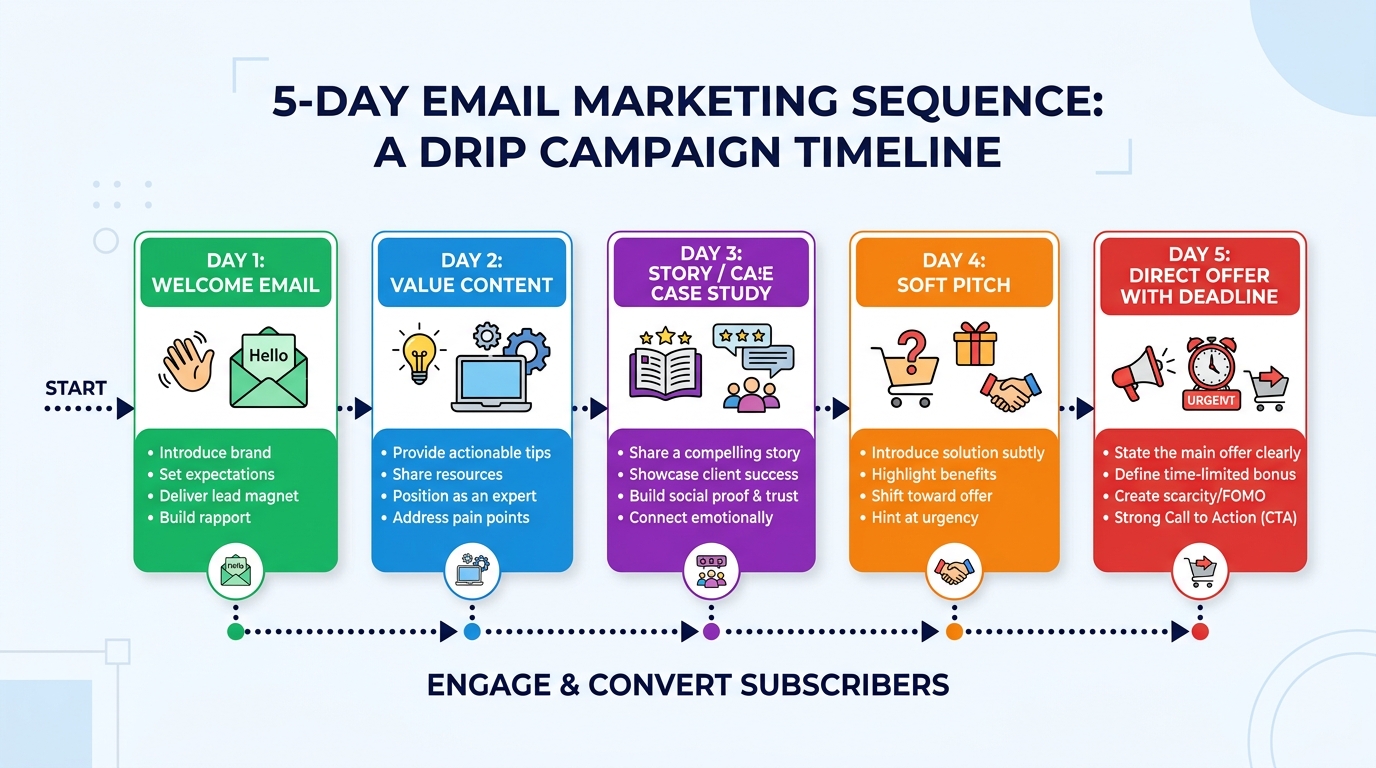
Here is the exact 5-Day framework we use to build trust without being overly aggressive:
- Day 1 (Immediate - The Delivery): Deliver the free PDF, template, or video you promised on your Squeeze Page. Set expectations for the next 4 days. Do not pitch anything.
- Day 2 (1 Day Delay - The Struggle): Build rapport by explaining how you struggled with the same problem your audience faces. Empathy builds trust.
- Day 3 (1 Day Delay - The Epiphany): Introduce the methodology that changed your workflow. Focus heavily on the “Why” and “How.” Again, teach before you sell.
- Day 4 (1 Day Delay - The Proof): Provide hard data, real-world examples, or screenshots demonstrating the success of your approach. This satisfies the logical buyer.
- Day 5 (1 Day Delay - The Action Plan): Provide a direct, clear call-to-action to implement the solution, which naturally includes your recommended tool or product.
According to the official Systeme.io documentation, structuring this top-to-bottom logic requires no coding, just a clear narrative flow.
2. Advanced Automation: Behavioral Tagging
Sending a sequence of emails is a great start. However, what separates a beginner from a streamlined 1-Person Empire is the use of Behavioral Automation.
Behavioral automation means your system reacts to how the user interacts with your content. Using Workflows, you can trigger specific actions based on engagement.
The Link-Click Trigger
Let’s say you share a valuable resource or an affiliate link in your Day 3 email. What happens if a subscriber clicks the link but doesn’t take the next step?
Using workflow logic, you can set a rule: “If Contact clicks link inside email -> Add Tag ‘Interested in Tool X’ -> Subscribe to a targeted Follow-up Campaign.”
This strategy allows you to segment your audience automatically. Instead of broadcasting generic messages, you send contextual emails based on their exact behavior. While this level of tagging often requires premium tiers in dedicated tools ($49+/month), it is built natively into platforms like Systeme.io on their free tier.
3. The Power of Campaign Sharing
Before you start driving traffic to your squeeze page, Quality Assurance (QA) is mandatory. Always send test emails to your own inbox to verify formatting and link routing.
But what if you want to scale this operation or teach others?
One of the most efficient ways to collaborate is by using shareable assets. Platforms that support asset sharing allow you to instantly clone your hard work. For example, Systeme.io’s share campaigns feature lets you generate a single Share Link.
When someone clicks it, your entire 5-day sequence—including the copy, the 24-hour delays, and the behavioral tagging structure—is imported directly into their account. This eliminates hours of manual data entry and provides immediate value to your clients.
Your Implementation Plan
Building an automated relationship with your audience shouldn’t require a massive budget or a PhD in coding. Focus on the architecture first.
- Map Your Narrative: Write the drafts for your 5-day educational series using the framework above. Teach before you pitch.
- Set Up Your Ecosystem: Consolidate your tech stack. We use Systeme.io to host the landing page and the emails in one database.
- Automate the Delays: Load your emails into a Campaign and set your 24-hour sending delays.
- Implement Behavioral Tags: Create at least one Workflow to tag users based on a key link click in Day 3 or Day 4.
👉 Start building your automated behavioral workflows natively with Systeme.io
This article is a “Spoke” in our Affiliate Marketing series. To see the full list of tools we recommend to streamline your business, visit our Software Directory.
Disclaimer: This post contains affiliate links. If you purchase through these links, we may earn a commission at no extra cost to you. This is how we fund our 1-Person Empire.